
When you upload an artwork to Cohart, you can choose how you'd like collectors to interact with it. Your listing status determines whether collectors can purchase the work immediately, contact you first, or simply view it as a sold piece.
If you would like any support migrating your inventory to your Cohart profile, we can help! Visit Setup and Support Services to learn more.
How to create a listing
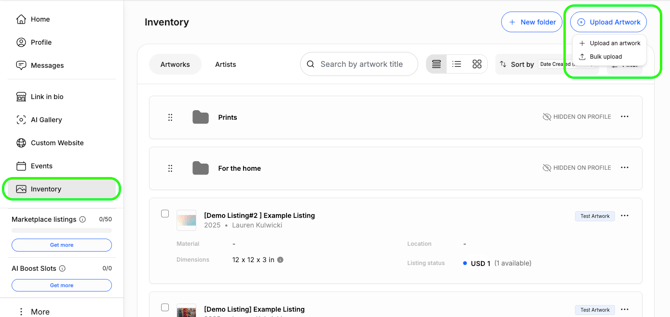
- Visit your Inventory
- Select + Upload Artwork
- Fill out all the required fields marked with * to publish your listing
- Save drafts for later if needed
How to edit or delete a listing
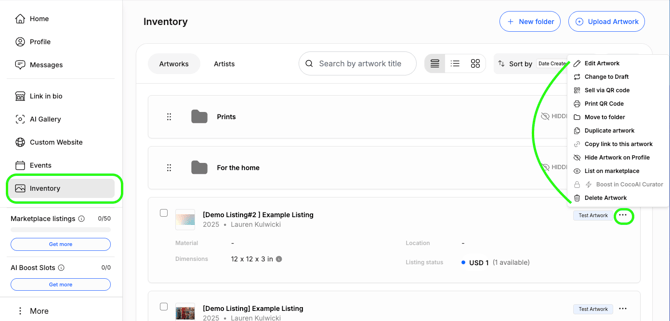
To edit an existing listing: Inventory -> 3-dots button -> Edit Artwork
You also have the option to hide artwork publicly on your profile, move to folders, duplicate or change to a Draft.
Listing Options
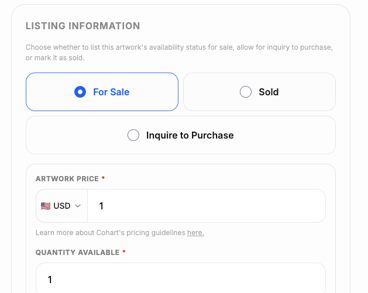
When creating or editing an artwork, you'll choose one of three listing types.
For Sale
Buyers can purchase the artwork immediately. Buy Now is the best option if you're ready to accept purchases online.
For Sale listings can be purchased:
- Directly through your Link-in-Bio or website
- Through your Cohart Discover marketplace listing (if you've listed the work publicly)
- Through a shared artwork link
- Via QR code checkout
Inquire to Purchase
Collectors must contact you before purchasing and cannot immediately purchase the artwork. Once you've agreed on the details, you can complete the sale using a Custom Invoice, by updating the listing to "For Sale," or another Cohart payment tool.
This option is ideal for:
- artworks with negotiable pricing
- works requiring shipping quotes
- commissions
- pieces that require a conversation before purchase
You will receive a DM in your Cohart Messages with information if a prospective buyer clicks the "Inquire" button.
Sold
Mark an artwork as Sold to keep it visible in your inventory and public profile while indicating that it's no longer available for purchase. Many artists and galleries choose to display sold works to showcase their sales history and previous exhibitions.
If you have processed the sale via Cohart, its listing status will automatically be marked as sold.
Why Your Listing Says "Quick Sell"
When you're viewing your own artwork, you'll see a Quick Sell button instead of Buy Now.
This is intentional - Quick Sell gives you a fast way to process an in-person or direct sale.
Collectors browsing your profile, website, Link-in-Bio, or Cohart Discover will instead see the Buy Now button, allowing them to purchase the artwork online.
In short:
- Quick Sell = seller view (for processing sales)
- Buy Now = buyer view (for purchasing artwork)
Marketplace Sales vs Direct Sales
There are two ways a collector may purchase your artwork through Cohart when browsing.
Direct Sales
If a collector purchases this way, the sale is considered a direct sale:
- your profile
- your Link-in-Bio
- your website
- a shared artwork link
- QR code
- Tap-to-Pay
- Custom Invoice
Direct sales are not charged a marketplace commission. Standard payment processing fees still apply where applicable.
Cohart Discover Marketplace Sales
If a collector discovers your artwork through Cohart Discover and completes a purchase, the sale is considered a Marketplace sale.
Marketplace sales include a marketplace commission.
You can always find the latest marketplace commission on our Pricing page.
For payout information, see Seller Payouts.
Increasing Your Visibility on Cohart Discover
Want more collectors to discover your work?
You can list artworks on Cohart Discover and optionally boost selected pieces using:
- Marketplace Listing Credits
- CocoAI Curator Boost Credits
Depending on your membership plan, you may already have credits included. Additional credits can also be purchased at any time from Manage Plan, even if you're using the free plan.
📖 Learn more: Marketplace Listings and CocoAI Boosts on CohartFrequently Asked Questions
Do I need a membership to sell on Cohart Discover?
No. Anyone can list artworks on Cohart Discover and purchase Marketplace Listing or CocoAI Curator Boost credits as needed. Membership plans simply include additional credits and other business tools.
Can I change an artwork from Inquire to For Sale later?
Yes. You can update an artwork's listing status anytime from your Inventory by selecting the 3-dots button to "Edit Artwork."
Where can collectors buy my artwork?
Collectors can purchase your work through:
- Cohart profile
- your Link-in-Bio
- your Cohart website
- Cohart Discover (if listed)
- QR codes
- Private Views
- shared artwork links
You can also process sales separately using Tap-to-Pay or Custom Invoices.
Resources
🎥 Video walkthrough: Upload Your Inventory
📖 Learn more: Marketplace Listings and CocoAI Boosts on Cohart
📖 Learn more: Overview of all Cohart Sales Processing Tools
📖 View current pricing