---
title: Seller Payouts on Cohart
description: We aim to provide a smooth transaction process for both you, the artist, and the buyer. This article covers how artist payouts work on Cohart, and what happens to the payment after your sale.
---
,\]
[Skip to content](https://support.cohart.com/artist-payouts#main-content)

Open main navigation
Close main navigation
- [cohart.com](https://cohart.com/)
[cohart.com](https://cohart.com/)
Questions? Cohart is here to help!
- There are no suggestions because the search field is empty.
1. [Support](https://support.cohart.com/?hsLang=en)
2. [For Sellers](https://support.cohart.com/for-sellers?hsLang=en)
3. [List & Sell on Cohart](https://support.cohart.com/for-sellers?hsLang=en#list-sell-on-cohart)
# Seller Payouts on Cohart
## How and when you receive your funds across all types of sales
Cohart Connect is our payout system for sellers. It allows payouts to be sent directly to your bank account through Stripe, supports multi-currency payouts, and provides faster processing times than our previous payout model.
### What You Need to Get Paid
To receive payouts through Cohart, you'll need to:
**1. Complete Cohart Connect**
Navigate to your [Financial Accounts](https://www.cohart.com/settings/stripe-connect) dashboard and complete the account linking process.
**2. Connect Your Bank Account**
Your connected bank account determines your payout currency. You can connect one or multiple eligible bank accounts depending on your region and supported currencies.
**Marketplace sales only: Tax form may be required**
For POS, Tap-to-Pay, invoice, and other Cohart Connect sales, you do not need to email a W-8 or W-9 to Cohart. Any required tax information is handled during Stripe onboarding. But if you're selling through Cohart Discover, Cohart is required to collect the appropriate IRS tax form before marketplace payouts can be issued.
- U.S. sellers: [W-9](https://drive.google.com/file/d/1K8pjwtCsdkGAFfYQX3vG1jojWY7lhHyw/view?usp=drive_link)
- International sellers: [W-8BEN](https://drive.google.com/file/d/11CRmC-FN1dQLjMNcQzRWNW3jTOabJ-Xe/view?usp=drive_link) (individual) or [W-8BEN-E](https://drive.google.com/file/d/1VRA1Orp1qJTHEYTx_GnLk08y6okeUIr_/view?usp=drive_link) (business)
You can email completed forms to [hello@cohart.com](mailto:hello@cohart.com) or request a DocuSign to complete them electronically.
For more details, see the FAQ below: [*Do I need to submit a W-8 or W-9?*](https://support.cohart.com/artist-payouts#w8-w9-form)
#### U.S. Sales Tax Management
Cohart will manage and file your US sales tax for sales processed via Cohart. To learn more about how this process works, visit [How Sales Tax Works on Cohart](https://support.cohart.com/local-sales-tax?hsLang=en).
---
### How Cohart Connect Works
🎥 Video Tutorial: [Connect Your Bank Account](https://www.loom.com/share/81c27a8160bf41dda1d8f3ecc1be0e5e)
Once you've connected your bank account through Cohart Connect:
- Your connected bank account determines your payout currency.
- You can connect one or multiple eligible bank accounts (depending on your country and Stripe support).
- Buyers can pay in their own currency.
- Stripe automatically converts the payment and sends your payout in your connected bank account currency.
**Important:**
- During Stripe setup, you can adjust the payout settings to manual or automatic frequency (daily, weekly, monthly, etc.). If you choose manual payout, you will need to manually initiate the payout process from your Financial Accounts page. [See more](https://support.cohart.com/artist-payouts#payout-timing).
- Once connected, you can only list artwork prices in the currency tied to your connected account(s). Buyers can still view and pay in their own currency - conversion happens automatically.
---
### Connecting Multiple Bank Accounts
You can connect **multiple currency accounts** (ex. EUR, USD, and AUD).
- If a matching currency account exists, the payout goes to that account by default
- If not, the payout goes to your chosen default account
You can only list artworks in the currency of your connected payout account(s). If your payout account is connected in EUR, you'll list your artworks in Euros and receive EUR, even if your buyer pays in AUD or USD.
**Examples:**
- You set your default account to AUD
- Buyer pays in EUR → payout goes to your EUR account
- Buyer pays in USD → payout goes to your USD account
- Buyer pays in CHF → payout goes to your default account (AUD) if no CHF account is connected
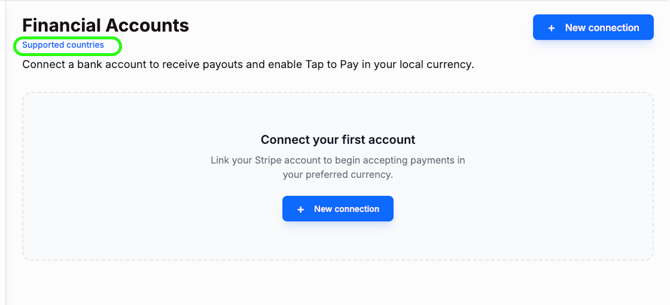
To view the most current list of supported currencies, visit your [Financial Accounts](https://www.cohart.com/settings/stripe-connect) dashboard and click the Supported Countries link:
---
### When Do I Get Paid?
Payout timing depends on your payout settings (during setup, or after via Financial Accounts → Manage), and the type of sale.
If you have **automatic payouts** enabled in your Cohart Connect dashboard, payouts generally arrive within 1–5 business days after the payment has cleared.
You can also choose the payout schedule that works best for you (depending on your country and Stripe's available options), including:
- **Daily:** Eligible funds are transferred each day.
- **Weekly:** Eligible funds are grouped and transferred once per week. (This is default during initial setup)
- **Monthly:** Eligible funds are grouped and transferred once per month.
If you have **manual payouts** enabled, funds will remain in your connected Stripe account until you manually transfer them.
#### Marketplace Sales
For Marketplace sales, payouts are handled separately by Cohart, and are typically sent by wire transfer. Payouts for Marketplace sales are released 60 days after the sale, or 48 hours after delivery and buyer satisfaction is confirmed.
---
### What’s Included in Your Payout
Your payout includes:
- Artwork price
- Minus processing fees
- Processing fees are determined by your plan tier. See your [plan](https://www.cohart.com/pricing)under Stripe Processing and Cohart Processing Fees to determine your processing fees.
- (*Discover sales only*) Minus any applicable marketplace commission
**Note for U.S. sales:** Sales tax is collected from the buyer and is not deducted from your payout.
---
### Marketplace Sales (Cohart Discover)
**What is the 20% marketplace commission?**
A 20% marketplace commission applies to sales generated through [Cohart Discover](https://www.cohart.com/). This fee is enabled when a collector discovers and purchases your artwork through the public Discover marketplace experience.
The 20% marketplace commission does not apply to your direct sales tools. You still keep 100% of sales made through:
- Your Cohart webpage
- Directly from your inventory
- Your Cohart email campaigns
- QR code checkouts / QuickSell
- Tap-to-Pay (POS)
- Private Views
For these direct sales, standard payment processing fees still apply based on your current Cohart plan, but there is no marketplace commission.
For Discover marketplace sales, your payout is calculated as: Artwork price minus applicable processing fees minus the 20% marketplace commission.
---
### Frequently asked questions about payouts:
**Can Cohart send payouts to non-U.S. bank accounts?**
Yes. Cohart supports payouts to both U.S. and international bank accounts through Cohart Connect, subject to Stripe's supported countries and currencies.
---
**Do I need to complete Cohart Connect?**
Yes. As of June 2026, Cohart Connect became the standard payout method for all sellers.
This change was made to provide:
- Faster payouts
- Enhanced seller protections
- Direct bank transfers through Stripe
- Improved multi-currency support
- A more streamlined payout experience
Because funds are sent directly through Stripe, payouts no longer need to pass through Cohart before reaching the seller.
---
**What happens if I make a sale but haven't connected my bank account through Cohart Connect?**
If you receive a sale through Cohart but haven't yet connected your bank account through Cohart Connect, we can still process the sale. However, the payout will be subject to a **60-day** holding period before funds can be disbursed, due to additional compliance and payment-dispute requirements when payments are processed through Cohart directly.
To receive payouts through our standard, faster payout process, connect your bank account throughCohart Connect in your dashboard under [**Financial Accounts**](https://www.cohart.com/settings/stripe-connect). Depending on your payout settings (which you can set up in your dashboard), connected accounts may be eligible to receive payouts as soon as the next business day.
**Important:** Connecting your bank account after a sale does not change the payout timing for a sale that has already been processed. We recommend connecting your account in advance in your Cohart Connect dashboard so you're ready to receive payouts from future sales without delays.
---
**Does Cohart collect sales tax?**
Yes. Cohart can collect and file applicable U.S. sales tax on eligible transactions. Learn more in [How Sales Tax Works on Cohart.](https://support.cohart.com/local-sales-tax?hsLang=en)
---
**Do I need to submit a W-8 or W-9?**
Only if you're receiving payouts from **Cohart Discover (marketplace sales).** Marketplace payouts are issued directly by Cohart and require the appropriate IRS tax documentation before payment can be released.
If you're receiving payouts through POS, Tap-to-Pay, invoices, or other direct sales, your payout account is managed through Stripe. Any tax information required for your Stripe account is collected during the Stripe onboarding process—you do not need to submit a W-8 or W-9 to Cohart for these sales.
*W-9 Form — For U.S. persons* A [W-9](https://drive.google.com/file/d/1ys1for1oN5fX0abcKYmvv4MBknvOc_zE/view?usp=sharing) is required for:
- U.S. citizens, U.S. residents, and U.S.-registered businesses (LLCs, corporations, partnerships, sole proprietors)
Why we collect it: Cohart uses the W-9 to verify that you are a U.S. taxpayer so we can issue payouts to you correctly, provide you with an annual form 1099-NEC or 1099-MISC to report your earnings to the IRS, and confirm that no withholding tax should be applied.
*W-8BEN / W-8BEN-E — For non-U.S. persons* If you are NOT a U.S. citizen, resident, or U.S.-registered business, you should complete a W-8 form ([W-8BEN](https://drive.google.com/file/d/1Zs59UbdbtceeVZNU3DAnq-iK36NBMezZ/view?usp=sharing) for individuals or [W-8BEN-E](https://drive.google.com/file/d/1bj7pg5aNipPYmH8mOUEGndYaVEl3P2tL/view?usp=sharing) for businesses).
Why we collect it:Foreign galleries and artists are not required to pay U.S. income tax, but the IRS requires this form on file to validate your foreign status. Completing a W-8 certifies your foreign status so:
- No U.S. income tax withholding is taken from your payout
- Cohart can legally release payment to you
---
**Is the shipping fee deducted from my payout?**
No. Shipping fees are paid separately by the buyer when applicable.
---
**Can I connect more than one bank account?**
Yes. Depending on your country and Stripe's supported currencies, you can connect multiple bank accounts to Cohart Connect.
For example, you might connect:
- a USD account
- a EUR account
- an AUD account
When possible, payouts are automatically sent to the matching currency account. If no matching account exists, payouts are sent to your default connected account.
---
**Can buyers pay in a different currency than my listings?**
Yes. Your artwork listings are priced in the currency of your connected payout account, but buyers can still pay in their own local currency. Stripe automatically handles the currency conversion, and you'll receive your payout in your connected payout currency.
---
**Can I use Cohart at a (ex) U.S. fair if my bank account is connected in another currency?**
Yes. Cohart can be used anywhere in the world.
With Cohart Connect, your listings are tied to the currency of your connected bank account. For example, if you connect an Australian bank account, your artworks will be listed in AUD and you'll receive payouts in AUD.
However, buyers can still pay in their own local currency. Stripe automatically handles the currency conversion and sends the payout to you in your connected payout currency.
For example:
- Seller account connected in AUD
- Buyer purchases in USD at a U.S. fair
- Buyer pays in USD
- Stripe converts the payment
- Seller receives payout in AUD
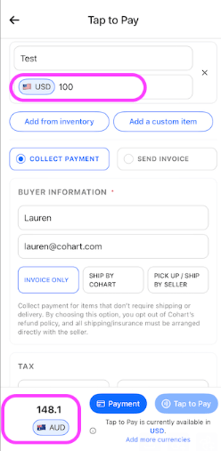
If you're speaking with collectors in another currency, you can also use the currency conversion view in the Business App checkout to quickly show them the equivalent price in their local currency before they complete the purchase. This is located at the very bottom left of the checkout flow in the Business App. Simply search the local currency and it will show you the price conversion in that local currency.
---
**Can I list my works in (ex) USD if my bank account is connected in another currency?**
No. With Cohart Connect, your listing currency follows your connected bank account currency.
If you would like to list works in USD, you'll need to connect a USD bank account through Cohart Connect. If you connect multiple supported bank accounts, payouts can be routed to the matching currency account when available.
---
**Why can’t I link a USD account when selecting some countries (ex. Italy)?**
Cohart uses Stripe as our payment processor, and there are currently regulatory limitations in certain European countries that restrict linking USD accounts for locally registered entities. For example, if your gallery is based in Italy, the system will default to EUR and you won’t be able to select USD at this time — even if your bank supports multiple currencies.
That said, you can still:
- List your artworks in EUR
- Accept payments from buyers in USD (or other currencies)
- Receive payouts accordingly through your connected account
We’re actively working with Stripe on this, and expanded support is expected in a future update.
---
**I want to sell in another currency at a fair, but I don't have a bank account in that currency. What are my options?**
Two common workarounds -
Option 1: Keep Your Existing Bank Account and Use the Currency Conversion View
When speaking with collectors, you can use the currency conversion view at the bottom of the checkout screen in the Business App to see the live equivalent price in another currency.
For example, if your artwork is listed at USD $100, you can switch the checkout view to AUD and show the buyer the current converted amount before they purchase (A$148.10):
This allows you to:
- Keep your account and payouts in your home currency
- Quickly communicate pricing in the buyer's local currency
- Avoid needing to open additional bank accounts
The buyer will be able to see the final amount before completing the purchase, and Stripe automatically handles any required currency conversion behind the scenes.
Please note: Depending on your bank account country and Stripe availability, Tap-to-Pay may not be supported in every currency. If Tap-to-Pay isn't available, you can still complete sales by manually entering the buyer's card details in the Cohart Business App.
Option 2: Open a Wise Account
If you'd prefer to receive payouts in another currency but don't have a local bank account in that currency, many sellers choose to open a Wise account. Wise is a financial institution that provides bank account details in multiple currencies.
Wise provides local bank account details in multiple currencies (such as USD, EUR, GBP, AUD, and others), which can often be connected to Cohart Connect.
Which Option Is Best?
Use your existing bank account if:
- You're happy receiving payouts in your home currency
- You only occasionally exhibit internationally
- You want the simplest setup
Consider Wise if:
- You regularly exhibit in multiple countries
- You want payouts in a specific currency
- You don't have a local bank account in the currency you'd like to use
---
**Why are payouts not instant?**
Cohart uses Stripe to securely process payments. Because we operate as a platform (not a standalone card reader), funds must:
- Be received and cleared
- Pass fraud and dispute checks
- Move through the banking system
This protects you from chargebacks, fraudulent transactions, and failed payments.
---
**Does the buyer also pay for packing?**
No, as the seller, you are responsible for packing the artwork and covering any associated costs. We recommend factoring the cost of custom packaging into the final price of the artwork. You can include an itemized breakdown on the invoice, clearly noting that the price includes packaging. This ensures transparency and gives the buyer visibility into the costs.
Alternatively, you can add a rough estimate of packaging costs to the artwork’s total price and mention that it covers custom packing.
---
**What if I don't have a supported bank account for Cohart Connect?**
Stripe unfortunately does not provide payment options in every country or currency. If your local bank account isn't supported by Stripe, or you're having trouble connecting a bank account through Cohart Connect, a common solution is to open a [Wise](https://wise.com/us/send-money/?utm_source=google&matchtype=e&device=c&userlocation=9028728&keyword=wise%20money%20transfer&campaignid=20934525298&adgroupid=161278434207&utm_campaign=20934525298___161278434207&gad_source=1&gad_campaignid=20934525298&gbraid=0AAAAADqE2bD4UzqIZvy3XMzLkYRMexHie&gclid=Cj0KCQjw0JnRBhDJARIsALobnXaO2gi7Ev-lZ8lZjXRFk46vR3xasvIaowh3YVXwh0hrPfYSOa1ZjEsaArl3EALw_wcB) account.
Wise provides local bank account details in multiple currencies (such as USD, EUR, GBP, AUD, and others), which can often be connected to Cohart Connect as payout accounts.
For example, if you're based internationally and cannot connect your local bank account through Stripe, you may be able to connect a Wise account instead and receive payouts this way.
Please note:
- Wise is a financial institution that provides bank account details in multiple currencies.
- Stripe is the payment processor that sends your payout.
- Currency and country availability are determined by Stripe and may vary by region.
---
**Why isn't my American Express (Amex) card working?**
If you have connected your bank account, you will be able to accept Amex card payments, depending on your bank's own regulations. We suggest confirming with your bank beforehand to make sure.
If you have not connected your bank account, Cohart does not support American Express (Amex) payments. This is an intentional setting designed to help protect Cohart sellers with consideration to dispute risks.
Compared with other card networks, American Express transactions generally carry a higher dispute risk for sellers because Amex consistently favors the cardholder in disputes. If a collector disputes a purchase from you or your gallery, they have a 90-day window to do so, and merchants almost always lose these cases. This means you could lose both the artwork and the payout after a sale is completed.
Because of this, Amex is disabled by default for payments that are processed without a connected financial account. In most cases, buyers are able to complete their purchase using a Visa, Mastercard, or another supported payment method instead.
If you would like to accept American Express payments, but cannot connect your own bank account, please contact the Cohart team. We're happy to discuss the potential risks with you and discuss enabling Amex processing on your account if appropriate.
---
**Are there payout fees when I transfer money to my bank account?**
No. Cohart does not charge a payout fee based on how often you choose to receive your payouts. In your Cohart Connect (Stripe) settings, you can choose the payout schedule that works best for you, such as daily, weekly, or monthly (depending on your country and Stripe's available options). This determines how frequently eligible funds are transferred to your connected bank account.
For example:
- **Daily payouts:** Eligible funds are transferred each day.
- **Weekly payouts:** Eligible funds are grouped and transferred once per week. (This is default during initial setup)
- **Monthly payouts:** Eligible funds are grouped and transferred once per month.
The payout schedule only changes **when** you receive your funds, not how much you receive.
- [What is Cohart?](https://support.cohart.com/what-is-cohart?hsLang=en)
- [Cohart Onboarding Guide](https://support.cohart.com/cohart-onboarding-guide?hsLang=en)
- [Price Guidelines](https://support.cohart.com/price-guidelines?hsLang=en)
- [For Sellers](https://support.cohart.com/for-sellers?hsLang=en#main-content)
- [Manage my Account](https://support.cohart.com/for-sellers?hsLang=en#manage-my-account)
- [Personalize my Profile](https://support.cohart.com/for-sellers?hsLang=en#personalize-my-profile)
- [How to Use Link-in-Bio](https://support.cohart.com/for-sellers?hsLang=en#how-to-use-link-in-bio)
- [How to Use CRM Tools](https://support.cohart.com/for-sellers?hsLang=en#how-to-use-crm-tools)
- [How to Use Website](https://support.cohart.com/for-sellers?hsLang=en#how-to-use-website)
- [How to Use Private View](https://support.cohart.com/for-sellers?hsLang=en#how-to-use-private-view)
- [How to Use Promo Code](https://support.cohart.com/for-sellers?hsLang=en#how-to-use-promo-code)
- [How to Create Events](https://support.cohart.com/for-sellers?hsLang=en#how-to-create-events)
- [List & Sell on Cohart](https://support.cohart.com/for-sellers?hsLang=en#list-sell-on-cohart)
- [Sell Using Cohart Tools](https://support.cohart.com/for-sellers?hsLang=en#sell-using-cohart-tools)
- [For Buyers](https://support.cohart.com/for-buyers?hsLang=en#main-content)
- [Buy on Cohart](https://support.cohart.com/for-buyers?hsLang=en#buy-on-cohart)
- [Buyer Tools](https://support.cohart.com/for-buyers?hsLang=en#buyer-tools)
- [Setup & Support Services](https://support.cohart.com/setup-support-services?hsLang=en#main-content)
- [White Glove Services](https://support.cohart.com/setup-support-services?hsLang=en#white-glove-services)
- [Cohart Training](https://support.cohart.com/setup-support-services?hsLang=en#cohart-training)
- [Guidelines for the Cohart Community](https://support.cohart.com/guidelines-for-the-cohart-community?hsLang=en)
[](https://www.cohart.com/)
Cohart Support
Copyright © 2026, Cohart