
To learn more about payouts across all types of sales, view Seller Payouts on Cohart.
Cohart Connect (Multi-Currency Payouts)
To receive payouts through Cohart, you'll need to complete Cohart Connect and link your bank account. Cohart Connect allows sellers to receive payouts in their local currency or currencies.
How It Works
- Connect your bank account in the Financial Accounts dashboard
- You can connect as many bank accounts as you like
- Your connected account (or chosen account) sets your default payout currency
- You list artworks in that currency
- Buyers can pay in any currency
- Cohart Connect automatically handles conversion
- You receive payouts in your connected bank account currency
- You are only responsible for your Cohart platform fee (depending on your Cohart plan)
Example:
If your account is connected in EUR, you’ll receive EUR — even if the buyer pays in AUD.
Important: Once connected, you can only list artwork prices in the currency tied to your connected account(s). Buyers can still view and pay in their own currency — conversion happens automatically.
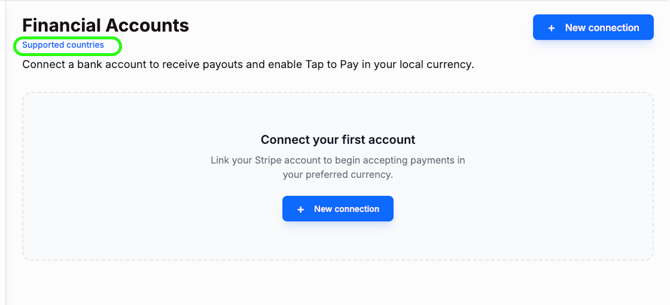
To view the most current list of supported currencies, visit your Financial Accounts dashboard and click the Supported Countries link:
Connecting Multiple Bank Accounts
You can connect multiple currency accounts (ex. EUR, USD, and AUD).
- If a matching currency account exists, the payout goes to that account by default
- If not, the payout goes to your chosen default account
Examples:
- You set your default account to AUD
- Buyer pays in EUR → payout goes to your EUR account
- Buyer pays in USD → payout goes to your USD account
- Buyer pays in CHF → payout goes to your default account (AUD) if no CHF account is connected
Using the Cohart Business App (In-Person Sales)
To learn more, visit Cohart In-Person Sales Processing Tools.
The Cohart Business App is the primary tool for processing sales at fairs.
Accept payments directly on your phone — no hardware required. This is the easiest and most flexible way to sell at the fair, especially if your inventory isn’t uploaded yet. With Tap-to-Pay, your phone becomes a card reader and buyers can simply tap their card to complete a purchase.
Requirements for Multi-Currency Feature on Tap-to-Pay
Multi-currency Tap is available when you’ve completed Cohart Connect and is designed for faster payouts and multi-currency support.
Requirements:
- Cohart Connect must be completed
- Tap-to-Pay only works in supported currencies - view the list under the Tap to Pay and Multi-currency section
Using Business Tap-to-Pay in your local currency:
For currencies that are not supported, you can still use the tool but you have to input the card details. Tap-to-Pay will not be available but you can still process payments via manual card entry.
Supported Currency Example (Tap-to-Pay)
A gallery connects a EUR account:
-
- Lists artworks in EUR
- Processes Tap-to-Pay in EUR (supported currency)
- Buyer taps card on phone
- Payout arrives in EUR (1–3 days)
Unsupported Currency Example (Hong Kong)
A Hong Kong gallery connects a HKD account:
- Lists artwork in HKD
- Tap-to-Pay in HKD is not a supported Tap currency but they can still accept payments via card entry in the app
- Payout arrives in HKD (1–3 days)
FAQs
Do I need to complete Cohart Connect?
Yes. As of June 2026, Cohart Connect became the standard payout method for all sellers.
This change was made to provide:
• Faster payouts
• Enhanced seller protections
• Direct bank transfers through Stripe
• Improved multi-currency support
• A more streamlined payout experience
Because funds are sent directly through Stripe, payouts no longer need to pass through Cohart before reaching the seller.
Can I use Cohart at a (ex) U.S. fair if my bank account is connected in another currency?
Yes. Cohart can be used anywhere in the world.
With Cohart Connect, your listings are tied to the currency of your connected bank account. For example, if you connect an Australian bank account, your artworks will be listed in AUD and you'll receive payouts in AUD.
However, buyers can still pay in their own local currency. Stripe automatically handles the currency conversion and sends the payout to you in your connected payout currency.
For example:
- Seller account connected in AUD
- Buyer purchases in USD at a U.S. fair
- Buyer pays in USD
- Stripe converts the payment
- Seller receives payout in AUD
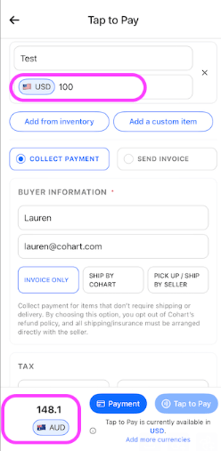
If you're speaking with collectors in another currency, you can also use the currency conversion view in the Business App checkout to quickly show them the equivalent price in their local currency before they complete the purchase. This is located at the very bottom left of the checkout flow in the Business App. Simply search the local currency and it will show you the price conversion in that local currency.
Can I list my works in (ex) USD if my bank account is connected in another currency?
No. With Cohart Connect, your listing currency follows your connected bank account currency.
If you would like to list works in USD, you'll need to connect a USD bank account through Cohart Connect. If you connect multiple supported bank accounts, payouts can be routed to the matching currency account when available.
Why can’t I link a USD account when selecting a European country (ex. Italy)?
Cohart uses Stripe as our payment processor, and there are currently regulatory limitations in certain European countries that restrict linking USD accounts for locally registered entities. For example, if your gallery is based in Italy, the system will default to EUR and you won’t be able to select USD at this time — even if your bank supports multiple currencies.
That said, you can still:
- List your artworks in EUR
- Accept payments from buyers in USD (or other currencies)
- Receive payouts accordingly through your connected account
We’re actively working with Stripe on this, and expanded support is expected in a future update.
Where can I learn more about payouts?
To learn more about payouts across all types of sales, view Seller Payouts on Cohart.
I want to sell in another currency at a fair, but I don't have a bank account in that currency. What are my options?
Two common workarounds -
Option 1: Keep Your Existing Bank Account and Use the Currency Conversion View
When speaking with collectors, you can use the currency conversion view at the bottom of the checkout screen in the Business App to see the live equivalent price in another currency.
For example, if your artwork is listed at USD $100, you can switch the checkout view to AUD and show the buyer the current converted amount before they purchase (A$148.10):
This allows you to:
- Keep your account and payouts in your home currency
- Quickly communicate pricing in the buyer's local currency
- Avoid needing to open additional bank accounts
The buyer will be able to see the final amount before completing the purchase, and Stripe automatically handles any required currency conversion behind the scenes.
Please note: Depending on your bank account country and Stripe availability, Tap-to-Pay may not be supported in every currency. If Tap-to-Pay isn't available, you can still complete sales by manually entering the buyer's card details in the Cohart Business App.
Option 2: Open a Wise Account
If you'd prefer to receive payouts in another currency but don't have a local bank account in that currency, many sellers choose to open a Wise account. Wise is a financial institution that provides bank account details in multiple currencies.
Wise provides local bank account details in multiple currencies (such as USD, EUR, GBP, AUD, and others), which can often be connected to Cohart Connect.
Which Option Is Best?
Use your existing bank account if:
-
You're happy receiving payouts in your home currency
-
You only occasionally exhibit internationally
-
You want the simplest setup
Consider Wise if:
-
You regularly exhibit in multiple countries
-
You want payouts in a specific currency
-
You don't have a local bank account in the currency you'd like to use