
What is this feature?
Create a personal website in just a few clicks using Cohart’s preset themes. No coding or design skills required - your profile info, artworks, and settings automatically populate the site for you.
Who is it for?
This feature is for those on Cohart who want a professional online presence to showcase and sell their work without the hassle of building a website from scratch.
Why do you need to create a website?
Having your own website helps you:
-
Build credibility and grow your brand
-
Share your Link-in-Bio in one simple link
-
Sell artwork directly to collectors
-
Receive inquiries or offers while staying in control
-
Connect social links and artist or gallery Pstory to your audience
How you can create your Cohart website
View this video for help getting started.
-
Go to your Custom Website Settings.
- Choose a theme that suit you.
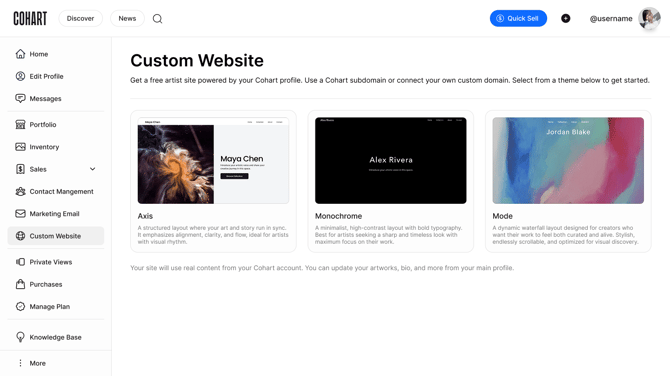
- Customize your website:
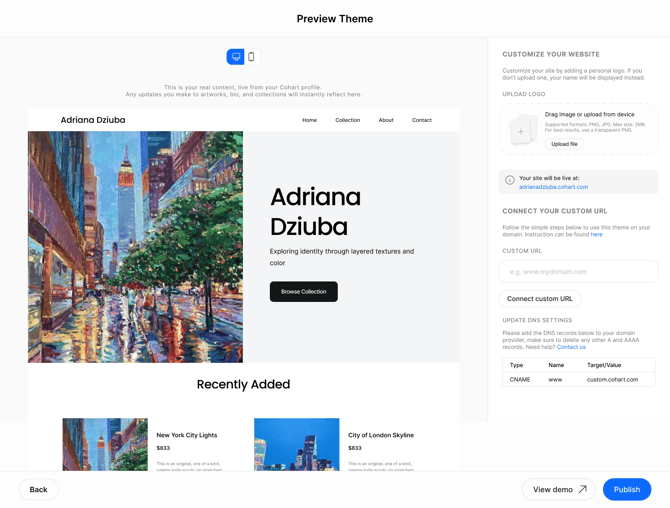
- You default logo (top left) for this page is your name. You can upload your own logo for this page by clicking on the
Upload file. - Your website name is generated from your username in the format of:
username.cohart.com. Or you can connect your own domain to this website.
-
- Hero section: the information here is populated from your Edit Profile setting:
Main Heading=First Namein Edit ProfileDescription=Headlinein Edit Profile
- Artworks/Collection section: Your artworks are automatically pulled from your active inventory on Cohart.
- Testimonials section is pulled from your featured one(s) in your Link-in-Bio.
- Footer links (Instagram, website, etc.) are automatically synced from your profile’s social links.
- Hero section: the information here is populated from your Edit Profile setting:
Testimonials are originally managed in Testimonials setting, which is different from your chosen to be featured in Link-in-Bio.
- The About page pulls from your Biography in Edit Profile — keep it updated in your profile for the best impact.
How the sales is processing on your Cohart website
When a buyer clicks:
-
Buy → they’re taken to checkout on Cohart
-
Inquiry or Offer → a form pops up for them to submit; they stay on your site
Here are some frequently asked questions about the Website feature:
Can I use my own domain?
Yes. You can connect your own domain (e.g., yourname.com) by updating the DNS settings at your registrar. See our domain connection guide →
How do I add or remove artworks?
Your website pulls directly from your inventory. Just add or archive works from your Inventory tab, and your site updates automatically.
Can I change the layout or design?
Currently, you can personalize the content (headline, bio, social links), but layouts follow our clean preset design to keep your site fast and mobile-friendly. More customization options are coming soon.
Can I track who visits my site?
Yes, members on certain plans can access analytics tools to help you understand your visitors and traffic.
What image sizes should I use for my website?
Using the right image sizes will help your site look clean and load quickly. Here are our recommended dimensions:
Homepage (hero banner — desktop view)
This is the large image at the top of your homepage.
- Recommended size: 1920 × 1080 pixels
- Shape: wide rectangle (16:9 ratio)
- Safe alternative: 1600 × 900 pixels
Homepage (section images)
These are images used in content sections on your homepage.
- Recommended size: 1200 × 675 pixels
- Shape: wide rectangle (16:9 ratio)
- Alternative: 1200 × 1200 pixels (square)
Artist page banner
This is the banner image at the top of your page.
- Recommended size: 1600 × 600 pixels
- Shape: extra wide rectangle (~3:1 ratio)
- Safe range: 1400–2000 pixels wide
Artwork / gallery images
These are your artwork listings.
- Recommended size: 2000 × 2000 pixels
- Shape: square (1:1 ratio preferred)
- Minimum: 1200 pixels wide
Logo
- Recommended size: 300 × 100 pixels
- For higher resolution: 600 × 200 pixels
- Format: transparent PNG
You can preview and adjust all images directly in your Custom Website Builder (Edit Site), so you can fine-tune how everything looks before publishing.