
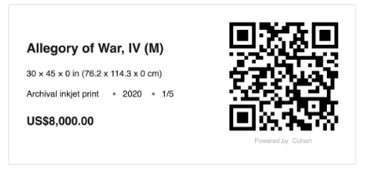
Artwork QR codes are one of the easiest ways to sell in person. Simply display a QR code next to each artwork, and buyers can scan it to view the artwork or complete checkout without needing assistance.
This is a great choice for static sales when the buyer is purchasing that one item for the listed price.
QR Code Checkout is ideal for:
- Art fairs and exhibitions
- Galleries and open studios
- Self-service purchases
- Fixed-price artworks
Before You Start
Before creating QR codes, you'll need to:
- ☑️ Upload your artworks to your Inventory
- ☑️ Add pricing to each artwork
- ☑️ Complete Cohart Connect if you plan to receive payments through Cohart
Creating QR Codes
You can generate QR codes individually or in bulk for multiple artworks at once.
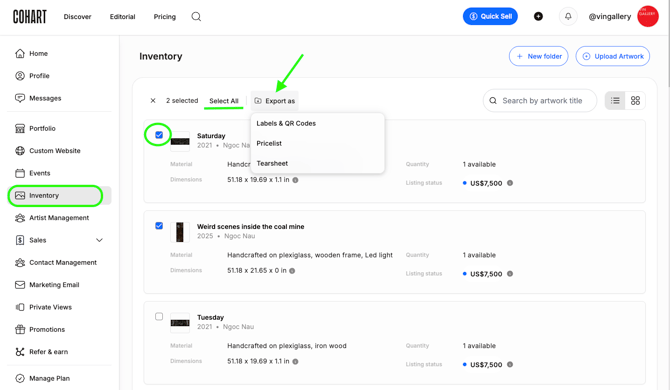
- Go to Inventory
- Create your listing by clicking + Upload Artwork - make sure to include pricing and mark as "For Sale"
- Select the artwork(s) you'd like to create QR codes for by ticking the checkbox next to the listing
- Click Export As
- Choose Labels & QR Codes
Choose Your QR Code Type
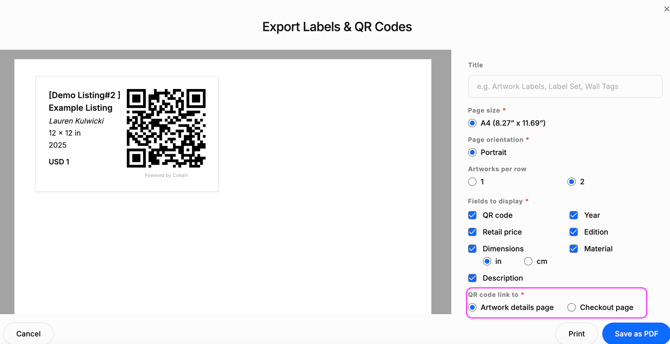
When exporting, you'll have two options.
Checkout Page
This QR code takes buyers directly to the checkout page for that artwork.
Best for:
- Fixed-price artworks
- Fast in-person sales
- Events where you're ready to sell immediately
Important: The QR code saves the artwork price, details, and applicable sales tax at the time it's generated. If you later change the price or other information, you'll need to generate a new QR code.
Artwork Details Page
This QR code opens the artwork listing instead of taking buyers directly to checkout.
Collectors can:
- view artwork details
- read the description
- browse additional images
- click Buy Now if they'd like to purchase
This option is ideal if you plan to reuse the QR code over time, since it always links to your live artwork listing.
Which Should I Use?
| If you want... | Choose... |
|---|---|
| Fast checkout at a fair with a fixed price | Checkout QR Code |
| A reusable QR code for your studio, gallery, or future exhibitions | Artwork Details QR Code |
Currency Views
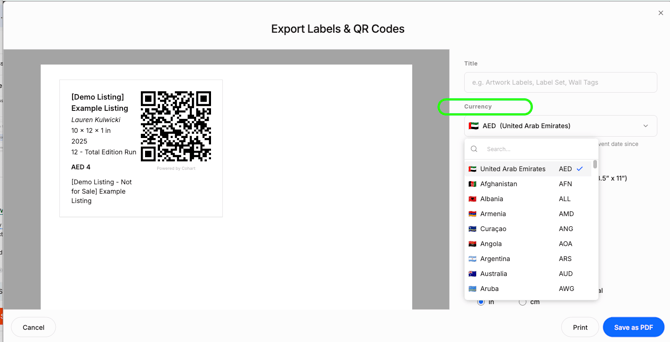
If you are selling in a local currency but want your listing to appear in a different currency, select "currency" and use the drop-down to convert into local pricing:
What Happens After a Purchase?
When a collector completes checkout through a Cohart artwork listing:
- payment is processed securely through Cohart
- the sale appears in your Sales Record
- the buyer receives a receipt if they share their email address in the checkout flow
- a digital Certificate of Authenticity is automatically generated
Frequently Asked Questions
Can buyers purchase without speaking to me?
Yes. Collectors can scan the QR code, review the artwork, and complete checkout entirely on their own device.
Can I print QR codes for multiple artworks at once?
Yes.Select multiple artworks in your Inventory and use Export As → Labels & QR Codes to generate them in bulk.
Do I need inventory uploaded first?
Yes. QR code checkout is linked directly to your artwork listings, so each artwork must exist in your Inventory with a price before a QR code can be created.
If you haven't uploaded your inventory yet, consider using Tap-to-Pay or Custom Invoices instead.
Can I reuse my QR codes?
Artwork Details QR Codes: Yes. These always point to your live listing and can be reused indefinitely.
Checkout QR Codes: Not recommended. Because they save pricing and checkout details when they're generated, you'll need to create new ones if those details change.
Do I need to link my bank account before processing sales?
Yes. Your bank account must be linked via Cohart Connect before your account can accept payments. For more information, visit Cohart Connect & Payouts .
Resources
🎥 Video walkthrough: Create Labels, Price Lists, Tear Sheets & COAs
📖 Learn more: See it in action at Affordable Art Fair NYC!
📖 Learn more: View all our sales processing tools
📖 Learn more: Cohart Connect & Payouts