
Resources:
🎥 Video Tutorial: Set Up U.S. Sales Tax for Events
What is Sales Tax?
Sales tax is a government-imposed tax on the sale of goods and services. In the U.S., it's typically collected at the point of sale, and the rate varies by state, county, and city.
As a marketplace platform, Cohart acts as the marketplace facilitator and is registered to collect and remit sales tax in the U.S. states where it's required.
How is Sales Tax calculated on Cohart?
Sales tax is calculated automatically during checkout, using the latest tax rates across U.S. jurisdictions.
- Online sales or custom invoice with Ship option: Sales tax is automatically applied based on the buyer's delivery address, once the shipping address has been filled in.
- Online sales with Pick up option: Sales tax is automatically applied based on the pickup location, if applicable.
- In-person sales (via Quick Sell) or custom invoice with Invoice Only: Sales tax is based on the location where the sale takes place. The seller enters the ZIP code of that location, and the tax is calculated automatically.
The sales tax amount is added on top of the artwork price or order subtotal and is shown clearly to the buyer at checkout. The seller’s payout is based on the pre-tax price, and Cohart, as the marketplace facilitator, handles tax collection and remittance.
Example:
- If the order is $1,000 with a discount of $50, the subtotal would be $950
- The Sales Tax rate is set at 8.625% to be calculated based on $950, making the Sales Tax $81.9375 and rounded to $81.94
- The total (without shipping fee) will be $950 + $81.94 = $1,031.94
Sales outside of the US
Cohart manages U.S. sales tax only. For sales outside the U.S., the seller is responsible for any VAT or sales tax that applies.
How do I (the seller) set the sales tax rate for Ship by Cohart sales?
For online sales or custom invoice with Ship option, the seller does not need to set a sales tax rate. Our system automatically calculates the sales tax amount based on the buyer’s address and zip code once they have filled it in.
How do I (the seller) set the sales tax rate for Pickup/Ship by Seller sales?
For online sales with Pickup/Ship by Seller option, the sales tax rate is determined based on the seller and their local state/city.
Set a default sales tax rate from your Profile:
- Navigate to the Edit Profile tab of your Dashboard.
- Visit the
Sales Tax section. - Enter the local zip code where you are selling from, to automatically calculate the Sales Tax rate (e.g. if you enter the LA zip code of 90230, the rate will show 10.25%).
- Alternatively, you can manually input a different Sales Tax rate (e.g. 8%).
If you set a Sales Tax rate from your Profile, it will become the default rate for all sales (excluding Ship sales) processed through Cohart. This rate will be applied when your buyer selects Pickup/Drop-off during the Buy Now checkout process, or when your buyer selects Invoice Only when paying for an invoice order.
If the buyer enters their shipping address for Seller to arrange shipment:
- The sales tax amount is calculated based on the buyer’s address and zip code once they have filled it in.
- This will replace the sales tax rate you have entered in your Profile.
How Do I (the Seller) Set the Sales Tax Rate for In-Person sales?
For in-person sales (via invoice or Quick Sell), sales tax is based on the location where the sale takes place.
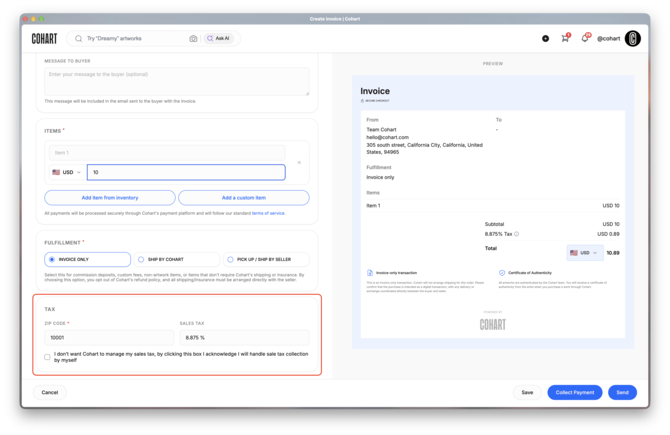
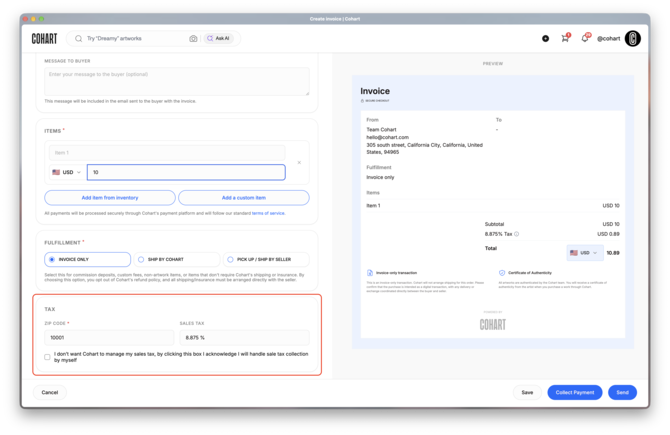
As the marketplace facilitator, Cohart collects and remits U.S. sales tax on in-person sales made through Cohart. To make sure the correct tax is applied, enter the ZIP code of the location where the sale takes place, for example your gallery or the art fair venue.
- Create an invoice or tap the Quick Sell button in the app.
- Enter the ZIP code of the sale location. The tax rate is calculated automatically.
- If you've saved a default location in your profile, its rate is applied automatically. Update the ZIP code if you're selling from a different location, such as an art fair.
Sales outside the U.S.: Cohart manages U.S. sales tax only. If the sale takes place outside the U.S., tick "This sale is outside the US". You are then responsible for any VAT or sales tax on that sale.
If you change the ZIP code on an invoice, it only applies to that invoice and does not affect future invoices or online sales.
Sales Tax and Payouts
As a marketplace platform, Cohart acts as the marketplace facilitator and collects and remits U.S. sales tax on sales processed through Cohart.
Cohart marketplace / Buy Now sales: Sales tax is calculated automatically at checkout. Cohart collects the sales tax from the buyer and remits it to the appropriate tax authority.
POS, Tap to Pay, Quick Sell, and invoice sales: Sales tax is calculated based on the location where the sale takes place. Cohart collects the sales tax from the buyer and remits it to the appropriate tax authority.
How this affects your payout: Sales tax is added on top of the artwork price and paid by the buyer. Your payout is based on the artwork price before sales tax. The sales tax is never taken from your earnings.
Sales outside the U.S.: Cohart manages U.S. sales tax only. For sales outside the U.S., the full payment is paid into your connected account, and you are responsible for any VAT or sales tax that applies.
To learn more about seller payouts and how to submit your information, visit Seller Payouts on Cohart.
How does Cohart file sales tax?
When a sale is processed through Cohart, the sales tax is handled in three steps:
- Collect: The buyer pays the sales tax at checkout, calculated on the location of the sale.
- Hold: Cohart keeps the sales tax separate from your payout. It is never taken from your earnings.
- File and pay: Cohart reports these sales and pays the sales tax to each state under Cohart's own sales tax registration, on the schedule each state requires (monthly, quarterly, or yearly).
Because the sales are filed under Cohart, they won't appear on your own sales tax returns, and you don't need to report them separately.
Frequently Asked Questions
Who handles sales tax on Cohart?
Cohart is a marketplace platform. As the marketplace facilitator, Cohart collects and remits U.S. sales tax on all sales processed through Cohart, including Cohart marketplace / Buy Now sales and POS, Tap to Pay, Quick Sell, and invoice sales.
The buyer pays the sales tax at checkout, Cohart remits it to the tax authority, and you receive the artwork price before sales tax.
Cohart manages U.S. sales tax only. For sales outside the U.S., you are responsible for any VAT or sales tax that applies.
What about local or in-person sales?
If you sell in person using Cohart Tap to Pay, Quick Sell, or an invoice, the payment is processed through Cohart, so Cohart handles the sales tax.
If you accept payments outside of Cohart (for example cash, Venmo, or your own card reader), you are responsible for collecting and remitting sales tax on those sales to your state or local tax authority. See the list of available payment methods on Cohart.
For example, in California, in-person sales paid outside Cohart may require you to register with the CDTFA and remit sales tax based on the sale location.
Do I Need a Seller’s Permit?
If you only sell through Cohart: in most states, you don't need your own seller's permit for those sales, because Cohart collects and files the sales tax.
If you accept payments outside of Cohart (cash, Venmo, other processors), you may need a seller's permit or a temporary permit for events, and you are responsible for reporting and remitting sales tax on those sales.
Some art fairs and states require every exhibitor to hold a permit, even when sales go through a platform. Check your exhibitor materials or the state's tax website if you're unsure.
Does Cohart provide tax documentation?
You don't need to send separate invoices to buyers for sales processed through Cohart. For your own records, you can download your transaction history from your account.
We recommend speaking with a tax advisor about your reporting obligations based on your country and business setup.
What if I don’t set the sales tax rate in my Profile for online Pick up sales?
If you don’t set a Sales Tax rate in your Profile for Online Pick-up sales, the rate will then be calculated based on the buyer’s location. At checkout, the buyer can enter their zipcode, or the zipcode of the location at the point of sale. The system automatically identifies the zipcode and the correct sales tax rate, and adds tax calculation to the order summary.
What’s the difference between sales tax and income tax?
Sales tax and income tax are different. Here’s a simple breakdown of some common tax situations:
- Sales tax: Paid by the buyer at checkout and calculated on the purchase price. For U.S. sales processed through Cohart, Cohart collects and remits it.
- Income tax: Based on your earnings from sales. You are responsible for reporting your own income. U.S. sellers may receive a Form 1099-K for payments processed, to help with their tax return.
- Customs duties / import taxes: May apply when artwork is shipped across borders. They are separate from sales and income tax and are set by the destination country.
- VAT (Value Added Tax): Used in many countries outside the U.S. VAT is not the same as U.S. sales tax. Cohart manages U.S. sales tax only, so VAT on sales outside the U.S. is the seller's responsibility.
What if I'm exempt from sales tax?
Sales tax is paid by the buyer, so your own tax status as a seller does not change it. Cohart collects sales tax based on the location of the sale and handles the remittance. You remain responsible for your own income tax.
Should sellers consult a tax advisor?
Yes. Cohart manages U.S. sales tax on sales processed through Cohart, but every seller's wider tax situation is different, including income tax, VAT, and sales outside Cohart. We can't give personal tax advice, so we recommend speaking with a qualified tax advisor.
I received a sales tax notice or late fee - doesn’t Cohart handle this?
Cohart collects and files sales tax for sales processed through Cohart. These sales are reported under Cohart, not under your own business, so you don't need to file sales tax for them.
However, if you have your own active sales tax account with a U.S. state (for example Florida), the state may still expect you to file returns, even if all your sales went through Cohart. In that case you may need to:
- File a "zero return" (reporting no direct sales), or
- Close your sales tax account if you no longer need it
A notice or late fee is usually related to that separate account, not to sales processed through Cohart.
If you're unsure, contact us and we'll help clarify your situation.