
Shipping Options
Every artwork can use one of three shipping methods:
Ship by Seller / Pickup
Choose this option if you plan to handle ship fees and fulfillment yourself.
This is commonly used when:
- You already have a preferred shipping carrier
- The buyer will collect the artwork in-person
- Shipping requires custom crating or white-glove delivery
- You'd like to arrange shipping separately
You'll coordinate shipping or pickup directly with the buyer and a shipping fee will not be added during checkout. You can still create a custom ship label in the Shipping dashboard if you wish.
Ship fees: You can either build shipping prices into the final artwork cost so that your buyer pays once during checkout, or you can send them a separate ship bill (via custom invoice) later after you have finalized the shipping fees.
If you prefer this option, you should note it in your artwork description so that the buyer knows to specifically choose "Pickup / Ship by Seller" option at checkout.
Invoice Only
Ideal when shipping will be determined later.
Common examples include:
- Commission payments
- Deposits
- Oversized or custom-crated artworks
- Shipping quoted after purchase
- Off-platform delivery arrangements
Ship by Cohart
When using Ship by Cohart, buyers can see real-time shipping rates and choose their preferred carrier (UPS, USPS, FedEx) directly at checkout.
Shipping rates are calculated using:
- your artwork package dimensions
- your package weight
- buyer's delivery address
During and after purchase:
- Buyer pays shipping during checkout.
- A shipping label is automatically generated in your dashboard under Sales → Shipping.
- You download and print the label.
- Package the artwork and affix the label.
- Drop it off with the selected carrier.
Adding Package Dimensions & Weight
When publishing your artwork listing, you’ll need to add artwork dimensions and weight, as well as package dimensions and package weight under the Package Dimensions & Weight sections. These details are used to calculate live shipping rates at checkout if the buyer selects Ship by Cohart.
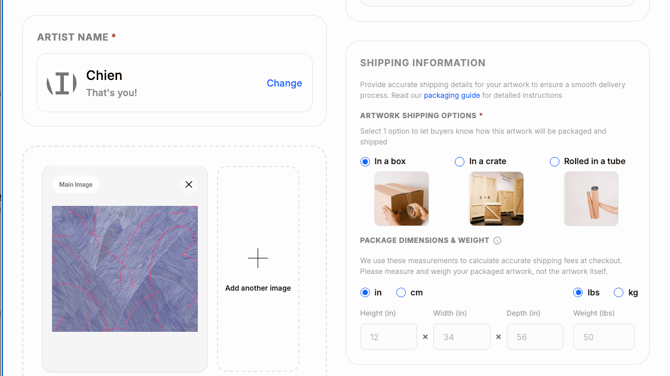
If you’re not ready to add this information yet, you can save the artwork as a draft and return to it later.
Estimating Package Size
To help avoid unexpected charges, we recommend measuring and weighing the final packed artwork as accurately as possible before creating the shipping label. When in doubt, round your measurements and weight up rather than down.
For more packaging recommendations, visit How to Package a Sold Artwork.
Most artworks are not fully packed when they’re first listed, so adding a package size estimate is okay. Add this information when available under the Shipping Information section in your listing. If you're not ready yet, we'll help you estimate based on your artwork's dimensions noted above.
As a general guideline:
- Add approximately 3 inches (7–8 cm) of protective space on every side using the artwork's height, width, and depth.
- Estimate the package weight as roughly three times the artwork's weight to account for packaging materials.
You can always update these measurements before the artwork sells.
If you use thicker packaging, custom crates, or extra protection for fragile works, increase the estimate accordingly.
Important: Shipping labels are purchased based on the package dimensions and weight entered at the time the label is created. Carriers may measure and weigh packages during transit. If the actual package is larger or heavier than the information provided, the carrier may apply an additional carrier adjustment to the shipment.
These adjustments are charged by the carrier and are not controlled by Cohart or Shippo. If the final package is larger or heavier than the information used to calculate the buyer's shipping cost, the available carrier rates may be higher than the amount the buyer originally paid. In this case, the seller is responsible for any additional shipping cost.
What if I don't enter package dimensions?
If package dimensions haven't been added, Cohart will estimate them using the artwork information.
Current estimates are approximately:
- package dimensions = artwork dimensions x 1.35 (35% buffer)
- package weight = artwork weight × 3 (triple)
These estimates are used to give the buyer an approximate shipping cost at checkout.
If neither artwork dimensions nor package dimensions are available, buyers can still complete checkout with shipping marked as To Be Confirmed (TBC).
After purchase:
- the seller will be prompted to create a custom shipping label,
- the buyer will be notified shipping is being arranged,
- seller and buyer communicate directly on their own to charge the shipping cost (we recommend using a Cohart Invoice for the separate charge).
If you prefer to charge your buyer separately for the final shipping cost
Ask them to select "Pickup / Ship by Seller" at checkout and send them a separate shipping invoice once you have packed/weighed your art and have determined the exact cost of shipping.
After purchase:
- the seller will be prompted to create a custom shipping label,
- the buyer will be notified shipping is being arranged,
- seller and buyer communicate directly on their own to charge the shipping cost (we recommend using a Cohart Invoice for the separate charge).
Ship By Cohart - Setup Instructions
Before using Ship by Cohart, make sure you've completed these steps:
☑️ Add your shipping address
Go to Dashboard → Edit Profile -> Address and make sure your shipping address is up to date. This address is used as the origin when calculating shipping rates.
☑️ Create your artwork listing
Upload your artwork in Inventory, mark it For Sale, and add the artwork price.
☑️ Add package dimensions and weight
Enter the packaged dimensions and weight so buyers receive accurate shipping rates during checkout.
☑️ Add your bank information for payouts
Enter your bank account information in Financial Accounts to set up for future payouts.
After an Artwork Sells
Custom Ship Label
To create a custom shipping label:
- Visit your Shipping dashboard.
- Click "+Create a shipping label."
- Enter the required information marked with a red asterisk.
- To find your buyer's ship address: Visit your Sales dashboard and click "View" next to the purchased artwork to see the full order details.
- Click "see delivery options" and choose your preferred carrier.
- Click "Create shipping label" to purchase and create the label.
- Select "Shipping Label" to download, save, and print your label.
Note: You can use the custom shipping label feature even for purchases not through Cohart.
Shipping documents
When viewing a shipped sale in your Sales Records, you can access the tracking number and download the shipping label. A separate packing slip is not included.
For international shipments, additional documentation such as a commercial invoice or other customs documents may be required depending on the carrier and destination. If you need help determining which documents are required for your shipment, please contact hello@cohart.com before shipping.
Tracking Shipments
You can track shipments for your custom labels anytime from: Shipping -> All Labels -> Track Order.
Both you and your buyer can use the carrier tracking number to follow delivery progress directly on the carrier's tracking page.
About Shipping Labels
Shipping labels are generated through Shippo, which compares available carrier services based on your shipment.
Depending on the route, buyers may see carriers such as:
- UPS
- USPS
- FedEx
Carrier availability varies by destination.
Label Validity
Shipping labels should be used within 30 days of creation.
We recommend shipping as soon as possible after the label is generated.
Seller Responsibilities
Sellers remain responsible for:
- securely packaging the artwork
- printing and attaching the shipping label
- dropping off the shipment
Cohart does not package the art or provide packaging materials.
Many carriers (such as USPS) offer free shipping supplies depending on the selected service.
For packing recommendations: How to Package a Sold Artwork
Frequently Asked Questions
Why am I seeing "Missing Package Information" on my artwork listing?
Your artwork is missing package dimensions or weight. Edit the artwork and complete the Package Dimensions & Weight section.
To edit an existing artwork, visit Inventory -> 3-dots button -> Edit Artwork.
For older listings: If package dimensions haven't been added yet, Cohart will estimate the package size using the artwork's dimensions with an additional allowance for standard packing materials. However, we recommend updating the package dimensions yourself whenever possible to provide buyers with the most accurate shipping rates.
Can I use my own shipping carrier?
Yes. Choose Ship by Seller / Pickup and arrange shipping directly.
Does Cohart pack or ship artwork?
No. You are responsible for packaging and shipping the artwork.
Can I schedule a carrier pickup?
Not currently. Sellers should plan to print the shipping label, attach it to the package, and drop it off with the selected carrier. We’ll update this guidance if carrier pickup scheduling becomes available through Cohart.
The package dimensions are larger than my estimate - who pays if the final shipping cost is higher than expected?
Shipping rates are calculated using the package dimensions and weight entered when the shipping label is created.
If the artwork hasn't sold yet, simply update the package information with your best estimate of the actual packed size and weight.
If the artwork has already sold and the package is larger or heavier than the information entered, update the package information before creating the shipping label whenever possible. If the carrier charges an additional amount because the actual package is larger or heavier than the information provided, the seller is responsible for the additional shipping cost.
Does Cohart send tracking updates?
A tracking number is generated once the label is created. Both the buyer and seller can use that tracking number to follow the shipment directly through the carrier’s website.
Are customs duties included?
No. Import duties, customs fees, and local taxes are determined by the destination country typically once the artwork has been inspected by local customs and are the buyer's responsibility.
What does "Shipping TBC" mean?
“Shipping TBC” (To Be Confirmed) means Cohart wasn’t able to return shipping rates from Shippo, so no shipping options were available to show the buyer at checkout.
This can happen when:
- The buyer’s shipping information is incomplete or invalid.
- The seller’s shipping information is incomplete or invalid.
- Package shipping dimensions are missing, including when one or more artworks in the order don’t have package dimensions.
The buyer can still complete their purchase with shipping marked as To Be Confirmed (TBC). Shipping can then be confirmed separately after the purchase.
Do I receive a packing slip with my shipping label?
Currently, Cohart provides the shipping label and tracking number for shipped sales. A separate packing slip is not currently available for download from the Sales Records.
For international shipments, additional documentation may be required by the carrier or destination country, such as a commercial invoice or other customs documentation. If you're unsure what documentation you need, contact hello@cohart.com and our team can help you determine what you may need before shipping.
Can I ship something that isn't linked to a Cohart sale?
Yes. You can create a custom shipping label from Sales → Shipping → Create a Custom Shipping Label. Enter your package details, sender/recipient address, choose a delivery option, and your label will be generated.
Do buyers receive a Certificate of Authenticity?
If an artwork is purchased through a Cohart artwork listing, the buyer automatically receives a Digital Certificate of Authenticity.
You can also generate a printable COA from Inventory.
Learn more about the digital Certificate of Authenticity here.
Does Cohart collect U.S. sales tax?
Yes. See How Sales Tax Works on Cohart.
How do payouts work?
Visit Seller Payouts on Cohart to learn more about how payouts are processed on Cohart.