---
title: How to Make an Inquiry or Offer on a Cohart Artwork
description: Learn how to use Cohart's Make an Offer and Inquire to Purchase features. Easily negotiate or inquire about artworks with our seamless process.
---
Unlock powerful email tools, advanced analytics, and priority support with Cohart Plan.
[Skip to content](https://support.cohart.com/inquiry-offer#main-content)

Open main navigation
Close main navigation
- [cohart.com](https://cohart.com/)
[cohart.com](https://cohart.com/)
Questions? Cohart is here to help!
- There are no suggestions because the search field is empty.
1. [Support](https://support.cohart.com/?hsLang=en)
2. [For Buyers](https://support.cohart.com/for-buyers?hsLang=en)
3. [Buy on Cohart](https://support.cohart.com/for-buyers?hsLang=en#buy-on-cohart)
# How to Make an Inquiry or Offer on a Cohart Artwork
## Learn how to use Cohart's Make an Offer and Inquire to Purchase features. Easily negotiate or inquire about artworks with our seamless process.
Cohart provides an innovative way for buyers and sellers to interact, offering features like "Make an Offer" and "Inquire to Purchase" to facilitate the art-buying process. These features allow buyers to express interest or negotiate pricing while ensuring smooth communication and transaction handling through Cohart.
### What is the "Offer" or "Inquiry" Feature?
The **"Make an Offer"** and **"Inquire to Purchase"** features on Cohart provide potential buyers with different ways to express interest in an artwork:
#### **Inquire to Purchase**
Buyers can inquire about an artwork, allowing them to ask for more details, confirm availability, or explore purchase options. This feature is especially useful for those who want to gather more information before committing to a purchase.
#### **Make an Offer**
When a piece is listed for sale, sellers can choose to allow buyers to negotiate the price. With this feature, buyers can submit an offer for a price lower than the listed amount, which the seller can then accept, decline, or counter.
Both features ensure that communication between the buyer and seller is handled through Cohart, keeping the process streamlined and professional.
---
### When Are These Options Available?
Sellers can control which of their artworks have these features enabled.
- **Inquire to Purchase**: Available on artworks that aren't yet sold, or those that seller has not listed for sale.
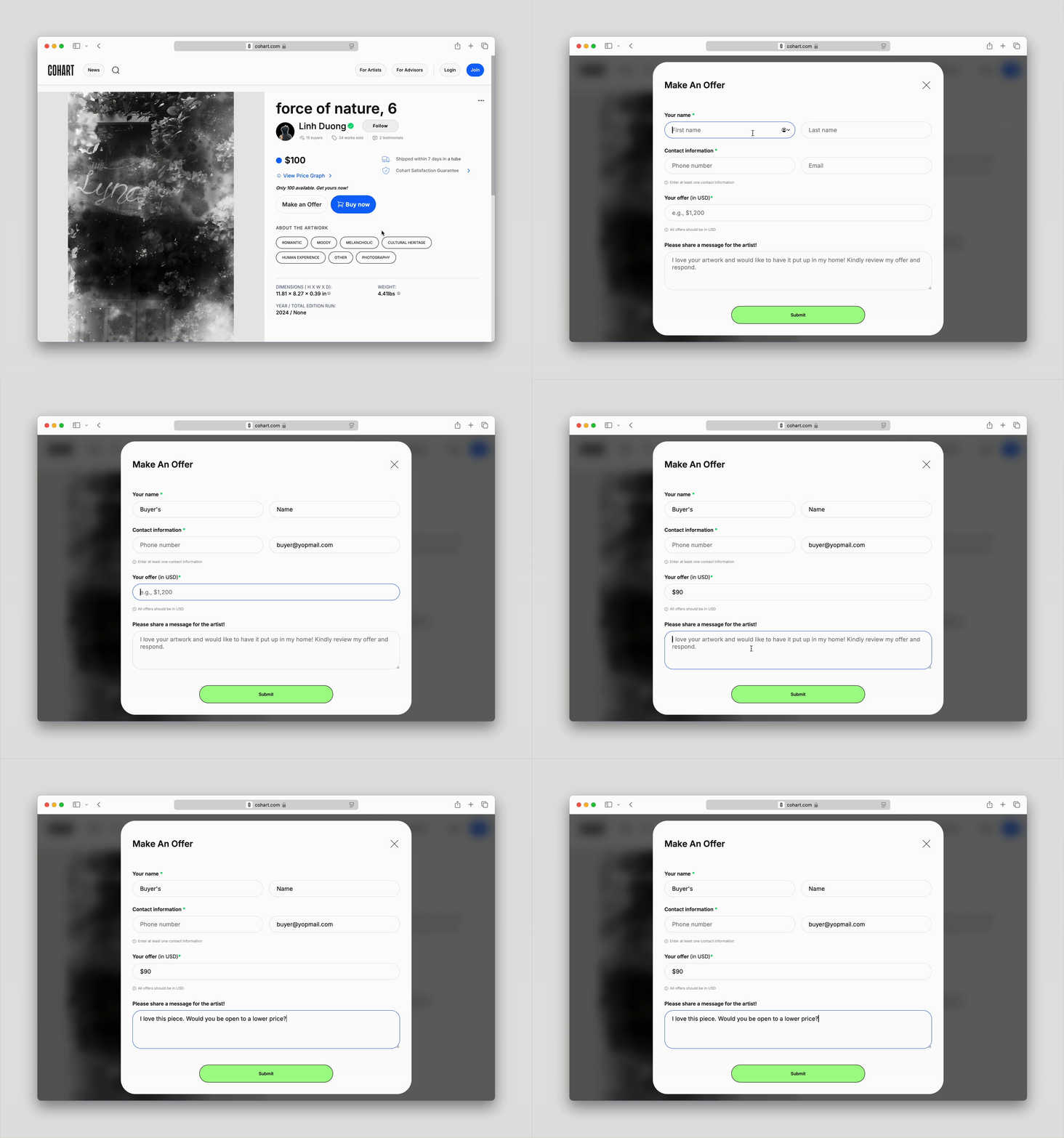
- **Make an Offer**: Available only for artworks where the seller has opted to allow buyers to make offers. If this feature is enabled, a `Make an Offer` button will appear alongside the regular `Buy Now` button on the artwork’s page.
---
### How to Make an Offer?
1. Browse the Cohart platform and locate the artwork you're interested in.
2. If the seller has enabled the option to receive offers, you'll see a button titled `Make an Offer` on the artwork page.
3. Enter your information and the amount you’d like to offer for the artwork. Keep in mind that many sellers expect offers to be within a **15-30%** range below the listed price.
4. Once you submit your offer, the offer will be sent to the seller's Cohart inbox and you can communicate with the seller directly. The seller can accept, decline, or counter your offer.
5. If the seller accepts your offer, Cohart will facilitate the transaction as we would with any other purchase on the platform. If the seller declines or counteroffer, we communicate with you and the seller to help drive the final sale.
---
### How to Make an Inquiry?
1. Browse through the available artworks and select one you're interested in.
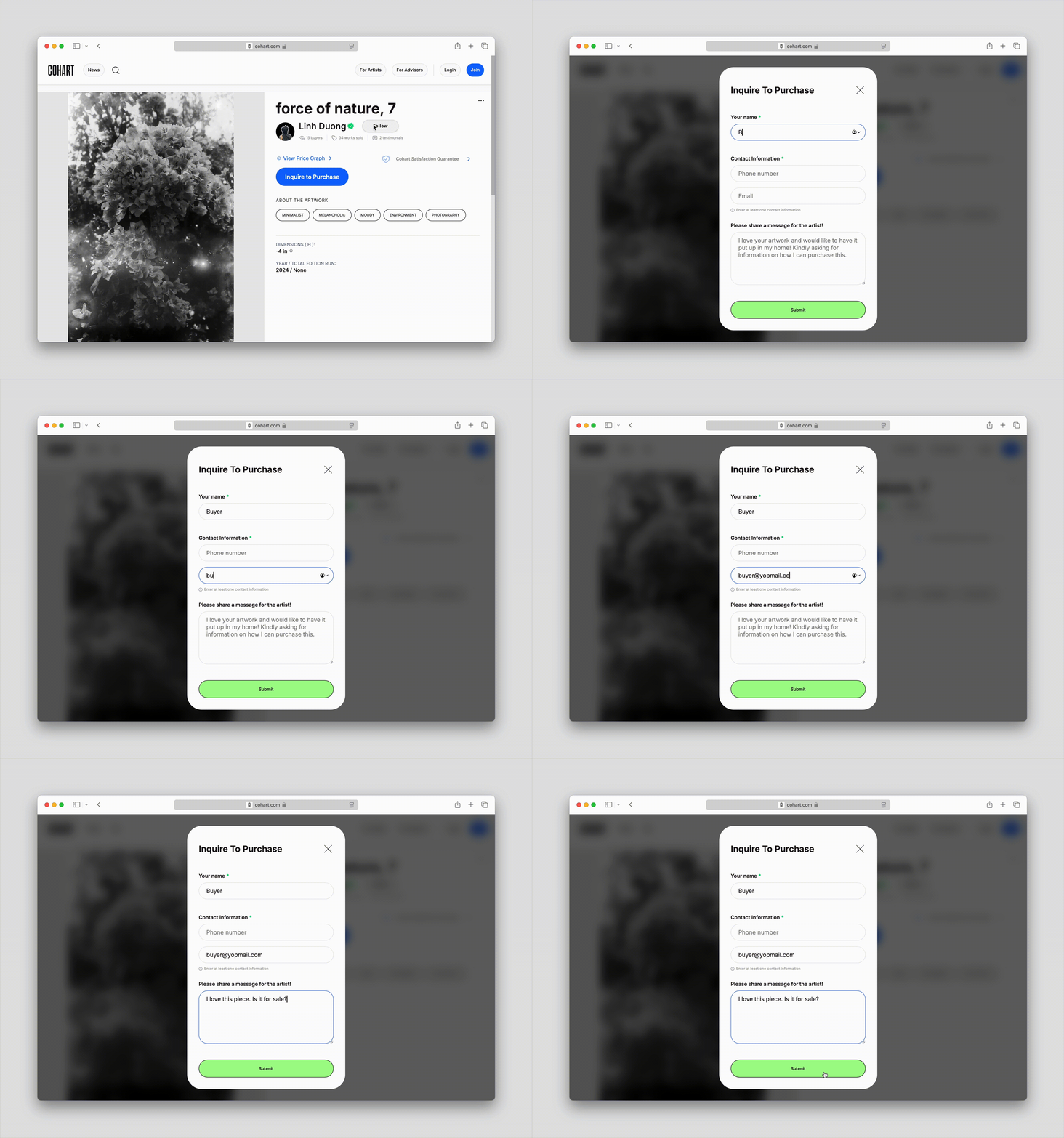
2. If the artwork is listed for sale, you’ll see a button titled `Inquire to Purchase`.
3. Fill out the inquiry form, providing details about your interest, asking for more information, or confirming availability. This helps you gather the necessary details before proceeding with a potential purchase.
4. Once submitted, the inquiry will be sent to the seller's Cohart inbox and you can communicate with the seller directly.
---
### What Happens After I Have Submitted the Offer/Inquiry?
1. When an offer or inquiry is submitted, the offer/inquiry will be sent to the seller's Cohart inbox and you can communicate with the seller directly.
2. For an inquiry, the seller will **confirm the artwork’s availability** and gather any additional details you might need. For an offer, the seller can accept, decline, or counter your offer via direct messages.
3. If the offer or inquiry is accepted, Cohart will proceed with **facilitating the sale**, including **payment and shipping arrangements**. If a counteroffer is made, the process will continue until an agreement is reached.
4. Once the seller accepts the offer or responds to the inquiry, you’ll be notified, and the sale process will continue, just like any other transaction on Cohart.
---
### Here are some frequently asked questions:
#### **Can I make an offer on any artwork?**
No. The "Make an Offer" feature is only available for artworks where the seller has enabled it. If the seller has not enabled this option, you will not see the "Make an Offer" button on the artwork’s page.
#### **How do I know if my offer was accepted?**
Once your offer is accepted, you will receive an email notification from Cohart confirming the acceptance. The next steps for completing your purchase will be outlined in the email.
#### **Can the seller counter my offer?**
Yes. If your offer is not accepted, the seller can counter your offer, and you’ll have the chance to accept or negotiate further. Cohart will manage the communication throughout this process.
#### **Can I cancel my offer or inquiry?**
If you wish to cancel an offer or inquiry, feel free to inform the seller or Cohart directly. You are not required to purchase the artwork when inquiring about a piece.
#### **Do I need to pay immediately after my offer is accepted?**
Once an offer is accepted, you will be provided with instructions for completing the purchase. This can happen at your convenience, but just to note that sellers generally do not hold artworks without a purchase so it's possible the piece could be sold elsewhere if you choose to wait to purchase.
- [What is Cohart?](https://support.cohart.com/what-is-cohart?hsLang=en)
- [Cohart Onboarding Guide](https://support.cohart.com/cohart-onboarding-guide?hsLang=en)
- [Price Guidelines](https://support.cohart.com/price-guidelines?hsLang=en)
- [For Sellers](https://support.cohart.com/for-sellers?hsLang=en#main-content)
- [Manage my Account](https://support.cohart.com/for-sellers?hsLang=en#manage-my-account)
- [Personalize my Profile](https://support.cohart.com/for-sellers?hsLang=en#personalize-my-profile)
- [How to Use Link-in-Bio](https://support.cohart.com/for-sellers?hsLang=en#how-to-use-link-in-bio)
- [How to Use CRM Tools](https://support.cohart.com/for-sellers?hsLang=en#how-to-use-crm-tools)
- [How to Use Website](https://support.cohart.com/for-sellers?hsLang=en#how-to-use-website)
- [How to Use Private View](https://support.cohart.com/for-sellers?hsLang=en#how-to-use-private-view)
- [How to Use Promo Code](https://support.cohart.com/for-sellers?hsLang=en#how-to-use-promo-code)
- [How to Create Events](https://support.cohart.com/for-sellers?hsLang=en#how-to-create-events)
- [List & Sell on Cohart](https://support.cohart.com/for-sellers?hsLang=en#list-sell-on-cohart)
- [Sell Using Cohart Tools](https://support.cohart.com/for-sellers?hsLang=en#sell-using-cohart-tools)
- [For Buyers](https://support.cohart.com/for-buyers?hsLang=en#main-content)
- [Buy on Cohart](https://support.cohart.com/for-buyers?hsLang=en#buy-on-cohart)
- [Buyer Tools](https://support.cohart.com/for-buyers?hsLang=en#buyer-tools)
- [Setup & Support Services](https://support.cohart.com/setup-support-services?hsLang=en#main-content)
- [White Glove Services](https://support.cohart.com/setup-support-services?hsLang=en#white-glove-services)
- [Cohart Training](https://support.cohart.com/setup-support-services?hsLang=en#cohart-training)
- [Guidelines for the Cohart Community](https://support.cohart.com/guidelines-for-the-cohart-community?hsLang=en)
[](https://www.cohart.com/)
Cohart Support
Copyright © 2026, Cohart