
Events on Cohart give you a dedicated place to share exhibitions, fairs, open studios, and other events with collectors.
Once created, your event can be found through Cohart Discover, shared directly with your network, and added to your Cohart Website or Link-in-Bio.
How to Create an Event
- Go to Events in your Cohart dashboard.
- Select Create Event.
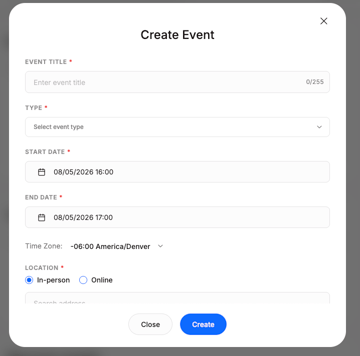
- Add your event information, including:
- Event name
- Event type
- Date and time
- Location
- Event description
- Event image or cover
- Public visibility
- Click Create to save your event.
Once your event is published, visitors can view the event page and explore the artworks associated with it.
More Event Details
You can also add additional settings to customize your event and manage how it works for visitors and exhibitors.
-
Donations: Allow supporters to leave a donation through your event page. Donations go 100% to you. You can track donations and payouts in your Donations Report.
-
Exhibitor Limits: Set a limit for how many artworks each exhibitor can add to the event. Leave this field empty if you don't want to set a limit.
Add More Information to Your Event
You can add additional tools and information to make your event more useful for visitors and easier to manage.
Feed: Share announcements, updates, and other information related to your event.
Map & Directory: Upload your fair map and exhibitor directory to help visitors navigate the event with a clear floor plan and directory.
QR Code for Fair Map: Create a dedicated QR code that visitors can scan at your event to open the fair map directly on their phones.
Sponsors: Showcase the partners supporting your event. Sponsor logos will appear on your event page and your Art Fair website.
Event Team: Add information about event managers, ticket scanners, coordinators, and other team members helping run your event.
Inviting Exhibitors and Guests
You can invite both exhibitors and guests to participate in your event.
To send an invitation:
- Open your event page
- Click Invite.
- Select whether you are inviting Guests or Exhibitors.
- Add people using their email address, Cohart username, or select groups you've already organized in Contact Management.
- Click Send.
Once someone accepts their invitation, they'll appear in the corresponding Guests or Exhibitors section.
Click See All to view accepted invitations as well as invitations that are still pending.
Add Artworks to Your Event
Once your event is created, you can select artworks from your inventory to feature on the event page.
This gives collectors a way to explore the works associated with an exhibition before they visit, while the event is happening, or after it has ended.
If you've invited exhibitors, they can also add their own artworks to the event.
📖 Learn more: How to Participate in a Cohart Event as an Exhibitor
Ticketing
Cohart also lets you create and manage event tickets while keeping your attendee information connected to your collector database.
You can create different ticket types for VIP access, general admission, early access, and more.
When creating a ticket, add:
- Ticket name - for example, VIP or Early Bird
- Description - include details such as seating, access, or ticket perks
- Price - set a price in your selected currency, or enter 0 to offer free tickets
- Quantity
- Ticket sale start and end dates
Scan Tickets on the Go
Use the Cohart Business App to scan tickets and check in attendees directly from your phone.
Where Your Event Appears
Your event can be shared across several places on Cohart, helping collectors discover it wherever they interact with your work.
Cohart Discover
Published events can appear in the Events section of Cohart Discover, giving collectors another way to discover exhibitions, fairs, and other events happening around the art world.
Your Cohart Website
Feature your events on your Cohart website through a dedicated Events tab. Visitors can browse upcoming and past exhibitions alongside your artwork and other information.
Your Link-in-Bio
You can also add events to your Link-in-Bio, making it easy to direct visitors from Instagram and other social channels to your upcoming exhibitions.
Digital Storefronts for Fairs
For Cohart Fair Partners
Some fairs and art organizations partner with Cohart to create a dedicated digital storefront for their event.
A Cohart-powered digital storefront gives your fair a branded online presence where collectors can explore participating exhibitors and their artworks before, during, and after the fair.
Think of it as an extension of the physical fair: a place where collectors can preview exhibitors before they arrive, browse works while they're at the event, and return to discover and purchase artworks after the fair has ended.
What Is a Digital Storefront?
Your digital storefront can serve as both a promotional site for the fair and an online destination for collectors to discover participating exhibitors.
The storefront brings your fair's exhibitors and artworks together in one browsable experience, while keeping each exhibitor's inventory connected to their Cohart account.
What's Included
A Cohart-powered digital storefront can bring together:
All Exhibitors in One Browsable Marketplace
Give collectors a single destination to browse and shop across booths before they arrive.
Live Artwork Inventory
Exhibitors can add their selected artworks to the storefront through Cohart. As works are added or sold via Cohart, the storefront can reflect those inventory changes, helping collectors see what's currently available.
CocoAI-Powered Discovery
CocoAI, Cohart's AI curator, helps collectors discover artworks based on their individual interests and taste. This means collectors can discover relevant works across your entire fair, not just from exhibitors they already know.
A Branded Fair Experience
Your storefront provides a dedicated digital presence for your event, giving collectors another way to engage with the fair beyond the physical venue.
Year-Round Discovery
The storefront doesn't have to disappear when the fair closes. Keeping the digital storefront live gives collectors additional time to revisit exhibitors, purchase artworks, and continue conversations after the event.
Before, During, and After the Fair
Your digital storefront can support the entire fair lifecycle:
-
Before the fair: Build anticipation by giving collectors a way to discover participating exhibitors and preview available artworks before they arrive.
-
During the fair: Give visitors an additional way to explore exhibitors and artworks while they're at the event. Collectors can move between the physical fair and digital storefront as they browse.
-
After the fair: Keep the conversation going. Collectors can revisit works they saw in person, discover pieces they may have missed, and continue exploring participating exhibitors after the fair ends.
How Your Exhibitors Participate
Once your digital storefront is set up, exhibitors can join through Cohart and select which artworks they'd like to feature.
Each exhibitor:
- Creates or uses their Cohart account
- Uploads their fair inventory
- Accepts the invitation to join the event storefront
- Selects the artworks they'd like to feature
Their selected works then appear on the event page and public digital storefront.
📖 Learn more: How to Participate in a Cohart Event as an Exhibitor
Interested in a Digital Storefront for Your Fair?
If you're a fair, gallery, or art organization interested in creating a Cohart-powered digital storefront, we'd love to talk.
-
Learn more: Cohart for Fairs
-
Contact: shyevin@cohart.com